Overlooking the obvious
Last week, I had a user interview for Cushion. It was with my friend, Doug, who I originally knew from attending a screening of his Linotype documentary, but we later became friends while I was in Colorado for a camping trip. Doug is a new-ish Cushion user, so I was eager to see how he used the app as a latecomer (versus one of my 12-year veterans who’s watched the app evolve over time). Luckily, Doug is an open book, so he was quick to share his screen and show me exactly how he uses Cushion—and how he doesn’t.
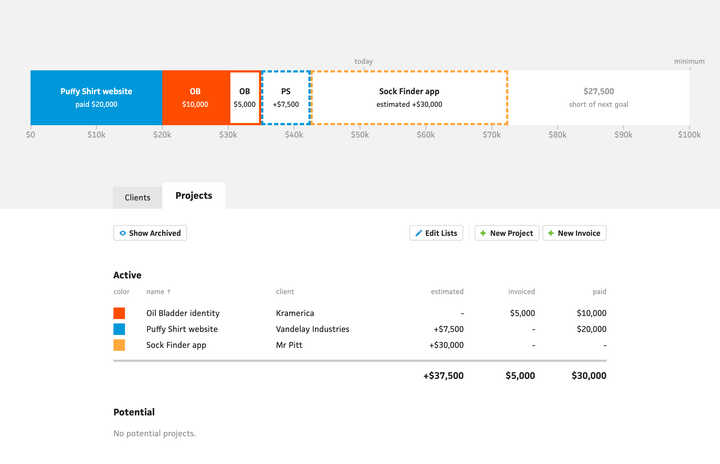
Cushion’s budget section
Doug’s use of Cushion revolves around the “Budget” section, which includes a big bar graph that compares your income and estimates to your financial goals. This section—particularly this graph—is hands-down the fan favorite amongst Cushion users, so his attraction to this section wasn’t a surprise. The surprise, however, was that he doesn’t use anything else in the app—he doesn’t schedule projects, he doesn’t track time, and he doesn’t send invoices. Like many freelancers, Doug uses a cornucopia of other tools to manage his freelancing, ranging from spreadsheets and Notion docs to a time-tracker he’s been riding out as a stowaway on the free plan.
To the 2015 version of myself—when I first launched Cushion—seeing this lack of Cushion usage in favor of other tools would leave me spiraling, like I must be doing something wrong. The grizzled, battle-hardened version of myself, however, knows the reality: every freelancer uses a handful of tools; a user doesn’t need to use 100% of your app to make it a good app, or invaluable to them; and the fact that Doug gets enough value out of a fraction of Cushion to convince him to pay for it is amazing.
Once we got past how Doug uses Cushion among his other tools, we started getting into the details, and I noticed something interesting. It wasn’t something Doug said or something he asked for, but rather where his “most important numbers” come from in the app. These numbers are the ones that he looks at to make sure he’s on track. When looking at these numbers, he’s able to know if he has enough work on his plate or if he needs to take on more.
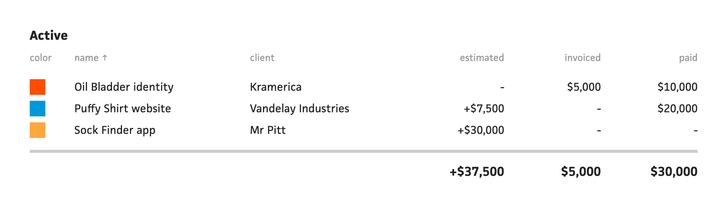
As much as the budget graph is an invaluable visual for many users, it’s shockingly not the source for these important numbers. Doug gets these numbers from further down the page in a table footer, and he’s only able to see these numbers if he keeps all of his projects in a single table—regardless of whether they’re active, potential, or completed. This means that Doug essentially avoids using a crucial part of Cushion’s workflow in order to see a number that’s crucial to him—his total estimated income. For Doug, dividing this number by his monthly expenses tells him exactly how long he’ll remain in the green before he needs to line up more work. Once I witnessed this, I knew I needed to immediately find a way to make that number more prominent.

Time-tracking summary stats
It didn’t take long before I realized the missing piece to this puzzle—the obviously overlooked. In Cushion, the invoicing and time-tracking sections have a row of what I call “summary stats”. These “stats” are at-a-glance numbers that will clearly provide a summary for the section. For time-tracking, it shows how much time you tracked this month, this week, and today, as well as how much you’ve earned today based on your rate.

Invoicing summary stats
For invoicing, it shows how much you were paid this year, paid this month, and how much you issued this month, as well as how much is outstanding. I’ve always been told by users how incredibly valuable these stats are. For a lot of users, it’s their “important numbers” that put them at ease after one glance. The problem in Doug’s case is that the budget section doesn’t have these stats, and Doug doesn’t use the rest of the app, so he’s never seen the invoicing stats—some of which are relevant to the budget section as well.
I’ve always told users that the budget section is one of the oldest sections of the app, which is true, but this revelation of the missing summary stats has become a real facepalm moment for me because it’s clearly the most obvious section to have summary stats… but it doesn’t. Up until this point, I assumed folks would use the graph to get a sense of these important numbers, but that still requires some visual translation compared to being shown an exact number. Similar to a lot of recent improvements I’ve made, summary stats in the budget section is long, long, long overdue. The budget section should’ve been the first section to get a row of these stats.
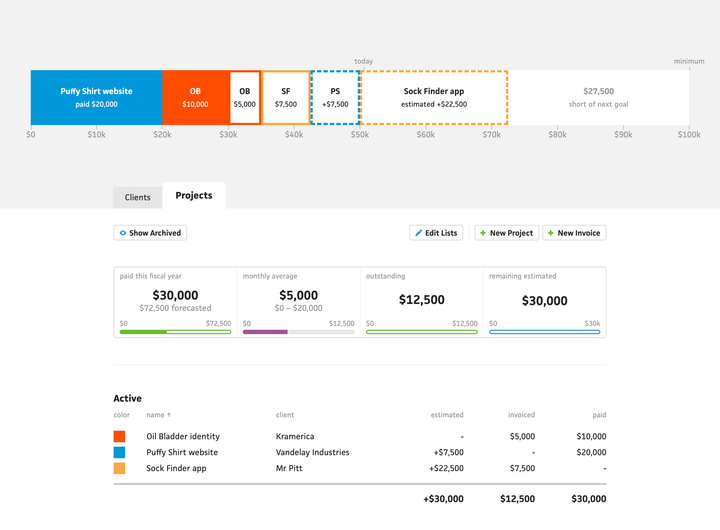
The new budget section with summary stats
A few days after my user interview with Doug, I launched the budget summary stats. For me personally as an active freelancer, it’s my new favorite feature, and similar to the effective hourly rate, it feels like Cushion is saving me from calculating a rough number in my head and instead just showing me what I need to see, so I can get back to doing the work I enjoy.
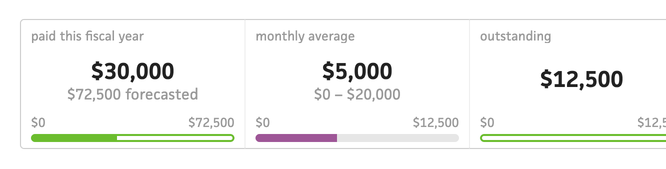
In addition to the total estimated income for Doug, I also added a new stat—monthly average income with a min/max range. This is especially useful for me to see if—on average—I’m hitting my monthly goal. Every freelancer knows how inconsistent income can look if all of your clients finally pay in the same month, so this at least levels out the year for you.
Even though this wasn’t a substantial feature to build, it feels like a substantial addition to the app. I really wish I could turn back time and introduce this when it should’ve made its way into Cushion, but that’s how it goes with long-living apps. The important part is that I recognized it was missing and implemented it—regardless of when.