Animating Quines for Larva Labs
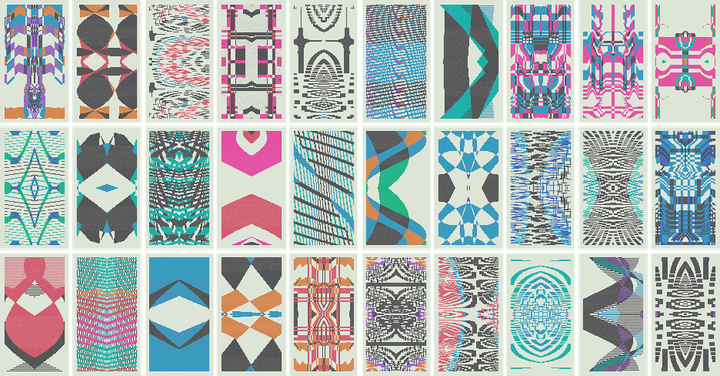
“Quine” by Larva Labs
A couple months ago, when I was first planning to go independent again, I ran into my friend, John Watkinson, on the walk home from my studio. John is half of Larva Labs along with my good friend, Matt Hall, and they’re responsible for industry-defining projects, like CryptoPunks and Autoglyphs. I actually sat next to them when they were first working on CryptoPunks, and they asked if I wanted to have any. I remember telling them that I was too busy working on Cushion to be bothered. So that was cool. In any case, we caught up for a bit and I mentioned my plans to return to freelance life. John had an immediate lightbulb reaction, as if this was perfect timing—and it was. It turns out Matt and John were weeks away from announcing a new project, and they were looking for someone to animate it.
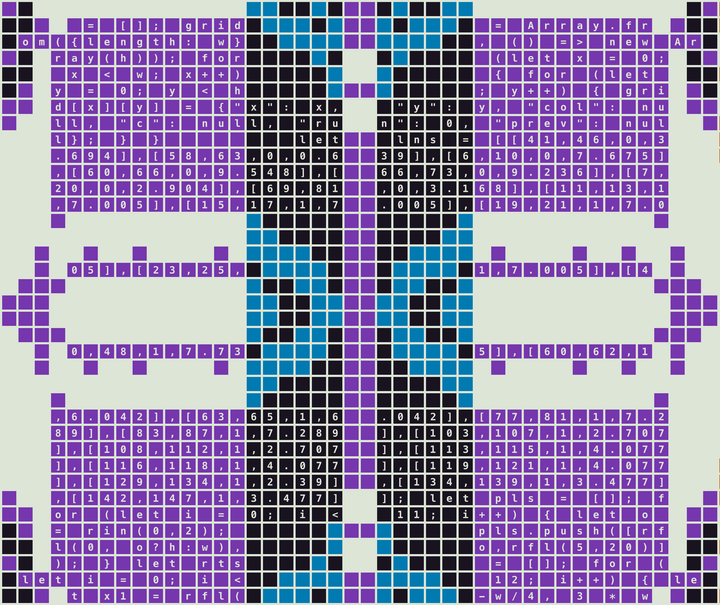
A quine at 100% scale
Matt invited me over to their studio, where they told me about Quine. In their words, “Quine is a generative art project that blurs the line between its code and the art it produces.” At first, these quines just look like cool procedurally-generated pixel art. And, while that’s true, if you look closer, you’ll see that there’s real code embedded within each quine. Matt explained to me that if you extract the code and run it, it’ll generate the next variation of that quine’s sequence. I was immediately intrigued from that concept alone, but it goes even deeper than that.
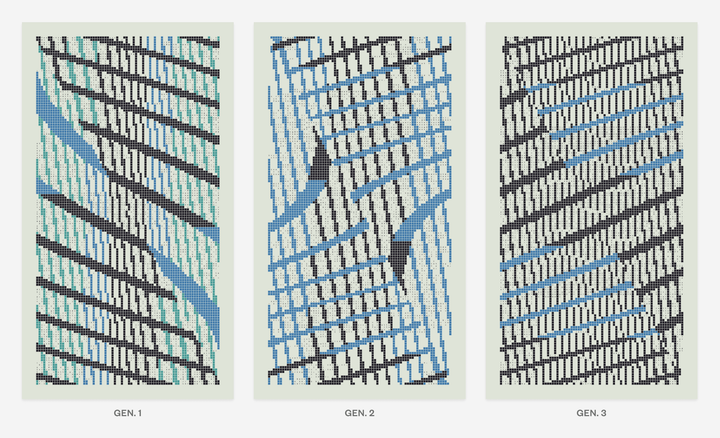
Each quine has a number of characteristics, including one that Matt and John refer to as its “quinity”. This can be a 3-Quine, a 5-Quine, a 7-Quine, etc. Basically, the quinity relates to the quine’s generation loop. For a 3-Quine, if you would repeatedly extract and run the code within each quine generation, after the third generation, it’ll loop back to the beginning. A 5-Quine will loop after the fifth generation, etc. As an engineer, I caught myself chuckling and shaking my head at how cool and clever this is. And, if you’re a sucker for collectibles, it gets even more interesting. Apparently, there are two very rare types of quines, known as a “Perfect-Quines” and “Pseudo-Quines”. Perfect-Quines, when executed, will only ever recreate themselves. And, Pseudo-Quines will generate an effectively infinite number of generations without ever looping. At this point, I went from intrigued to hooked.
So, where does animation come into play? If the written explanation of Quine had you seeing the math meme, you’re not alone. Sometimes the easiest way to explain something complex is through visuals. Matt and John thought that an animation simulating the generation process would go a long way to demonstrate the overall concept. That’s where I come in.
At its core, the code that generates and is embedded within each quine is JavaScript, and when executed, this code generates an SVG. Coincidentally, I happen to have a ton of experience animating SVGs from my time at Stripe, so I’m right at home with this project. The SVGs that make up these quines, however, are very dense to say the least. Each quine is 1440x2560 pixels in dimension, and the squares that construct each quine are 14x14 pixels with a 2-pixel gap between them. This means that a single quine as an SVG could potentially have up to 14,400 <rect> elements. On top of this, each quine could also include between 3,500 and 4,500 <tspan> elements from the code printed within it. For anyone familiar with SVG performance, this is a lot of elements to display, let alone animate. I didn’t waste any time even considering we stick with SVGs before immediately switching my attention to <canvas>—the hardware-accelerated HTML element that can animate thousands of shapes without breaking a sweat. Even though Canvas can run circles around SVGs, I still felt compelled to do some performance testing.
Performance testing
I started by testing the extreme—animating all the shapes individually. I had no intention of actually running with this approach, and I knew it would perform the slowest, but I still wanted to establish a baseline to gauge how slow this would be—surprisingly, not bad! I then tried animating the text that would represent the code. Instead of animating the positions again, I focused on transforming scale. Again, not bad! Next, I tested the more realistic approach—animating elements as groups. This would certainly improve performance because I’m not only animating a single layer, but I’m also avoiding the iteration loop on every element. Lastly, I tested animating groups of elements that are layered behind text. Because of the flat nature of <canvas>, I didn’t expect this to factor into performance at all, but I was still curious to see it as a disorienting visual!
Quine printing variations
Once I had a better grasp on performance, I moved onto the actual animation. When thinking about the quine generation process, I immediately imagined a quine being “printed,” like an inkjet printer—line by line in a single direction. From the performance tests involving layered groups, I also imagined printing individual colors as separate passes, like with screen printing. Combining the two metaphors, I iterated through several variations:
-
single direction linear passes where the “ink” carries with the squeegee until it reaches its spot
-
single direction passes with easing
-
bi-directional passes with easing
-
single direction linear passes with a printer line that reveals each row
I found myself most drawn to the mechanical approach—slow and linear. I wanted the quine to emerge from each layer with a sense of anticipation.
Quine code inversion
Now that I had the movement dialed in, I zoomed in on the detailed part of the quine—the code within it. Originally, I “printed” the code together with its squares, but this buried the lede too much. By printing them together, they held equal weight despite the code being the reason the quine even existed. And to the untrained eye, you might even miss the code altogether if it’s printed along with the squares. Thinking back to the concept of layers, I decided to try printing the code first—on its own layer—to emphasize that it can stand alone and that the viewer should notice it. Only then do I start printing the layers of squares to combine the two. In doing so, I introduced another transition opportunity—the code inverting itself as the squares are printed. With this visual, we really drive home the message that there’s code within the quine.
Quine scanning animation
With the printing animation behind me, it was time to move onto the scanning animation. I already highlighted that there’s code within the quine, but I also needed to communicate that the code is both meaningful and legible—not just a random snippet. People typically interact with code using an IDE, so why not include one in the demonstration? Taking a page out of the text streaming effect often seen in AI chat interfaces, I decided to combine this effect with a faux “scanner” that passes over the original quine. As simple and straightforward as this is, it gets the point across that the code within the quine is actually real and recognizable when displayed in a familiar format and environment.
Quine generation animation
Now that I had printing and scanning animations in a good place, it was time to combine the two. I would start with the printing animation for the original quine generation, but then I’d reuse it for the next generation, in parallel with the scanning animation. Even though I built these animations separately, they locked into place so well that I had no notes. The overall animation continued to write itself as long as I continued to lean on the analog metaphors. Print the quine. Scan the quine. Scanning the quine prints the quine.
The final Quine announcement video (animation at 0:52)
Upon screen recording the animation, I had my deliverable—an animation that would be used as b-roll for Matt and John’s announcement video. And, thanks to the animation being in video format instead of live and interactive, I didn’t need to worry about all of the typical considerations that I’m used to, like responsiveness, performance on slower machines, compatibility with different browsers, or what even happens next. I could focus on a single animation that visualizes the core concept while Matt voices over the it with the verbal explanation. Larva Labs announced Quine on Art Blocks, where they also held their auction for 477 of the 497 quines. The auction was another success with the sale closing at 7.56 ETH ($31,000) per Quine NFT.
Once the dust settled from the auction, Larva Labs reached out again regarding an extension of the project. In a few weeks, they would be displaying Quine in gallery format at Art Basel in Miami. In addition to framed prints of several quines on the walls and a massively long table with a grid of every quine, they would also have a 4K TV to, again, aid in visually demonstrating the concept, but as a looping video this time. The video format deliverable still saved me from the considerations that go into a live animation, but now I needed to “upgrade” the animation. Instead of finishing the animation after scanning and printing once, it would need to generate an entire quine’s sequence with transitions, automatically proceed to the next quine, then loop back to the beginning when finished. John provided me with a list of 10 quines, with quinities ranging from 3 to 11. This would result in an animation that is 8 minutes and 28 seconds in length.
Quine sequence animation
Luckily, the layout of the quine generation flow, along with my intuition for how it should move, led me to nail it on the first try. Upon scanning and printing the next generation in a quine’s sequence, the two generations and its “code editor” would slide and fade, so the generated image would become the source image, which would get scanned and print the following generation. In theory, I could let the animation run uninterrupted and it would loop forever because my actual animation code literally extracts the quine’s code and uses it to generate the next animation. A generator of generators, itself.
Quine at Art Basel (animation at 0:05, 0:19, and 0:40)
It might go without saying, but I absolutely loved working on this project. After years of solely working on product and web, life presented me with an opportunity to return to the creative code world—in a practical sense. I also got to collaborate with close friends I haven’t jammed with since the last time I freelanced in 2018. This truly felt like the perfect reintroduction to independent life, and it was all because I bumped into John on the walk home from the studio that night.